

app store badge google play badge

Get the mobile app for the best Kahoot! experience!

The all-in-one toolkit for teaching, learning, and social gatherings

Kahoot!+ helps teachers and educators create engaging lessons, enables students to study smarter, and turns any social occasion into entertaining, interactive learning.

Get Kahoot!+ from $3/mo. Save 20%. Offer ends July 31.

Get started Try for free
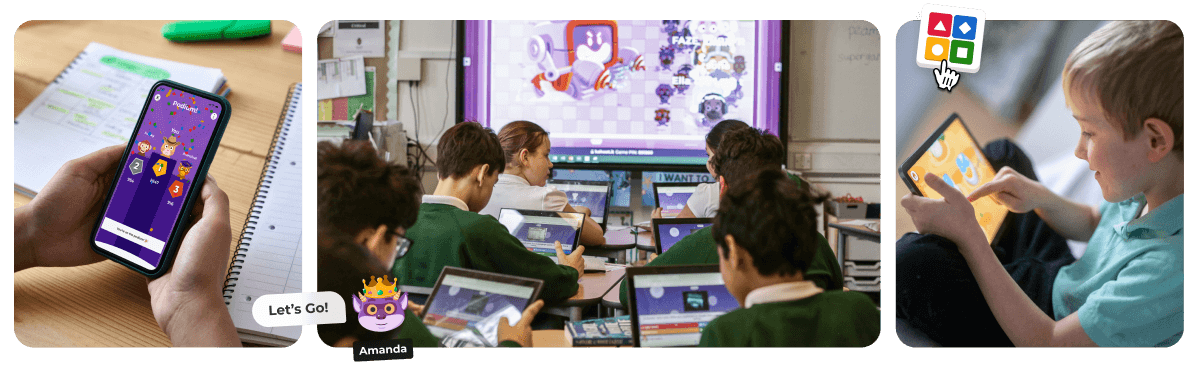
Collage of students playing Kahoot on tablets in class and a hand holding a phone showing the Kahoot podium screen

Make learning awesome with Kahoot!+

Primary school students in green uniforms using laptops for a Kahoot quiz while a game shows on the smartboard

K12 EDUCATORS

The all‑in‑one teaching toolkit

Kahoot!+ is is loved and trusted by millions of teachers and students worldwide. It’s perfect for creating engaging lessons, homework and assignments, reviews, and formative assessments.

Read more

Teacher presenting a Kahoot quiz to adult learners, with a leaderboard and question screen displayed behind her

HIGHER EDUCATION EDUCATORS

AI-powered teaching and student engagement tools

The toolkit is perfect for teaching, learning, review and assessment, helping you achieve end-to-end course engagement. Loved by millions of instructors and students worldwide.

Read more

Student pointing at a Kahoot planet quiz on a smartboard while classmates and a teacher follow along with tablets

STUDENTS

The AI study tool to ace your exams

Master topics anytime and anywhere with Kahoot!+ Instantly create study sets with Al. Scan your notes and transform them into unlimited flashcards, practice tests, and more in seconds.

Read more

Family of four smiling and playing a Kahoot quiz together on a phone and laptop at home on the sofa

FRIENDS, FAMILY AND SOCIAL USE

The best way to learn and play

Bring fun and learning to trivia nights, parties, and celebrations with premium ready‑to‑play games or create you own in seconds with AI.

Read more

Happy girl with earphones sitting by a window at sunset, smiling while playing a learning game on a tablet

KIDS AND PARENTS

Apps and games for learning

Unleash your kids learning power through play. Build your child’s reading, math, and coding skills, and help them navigate their feelings with award-winning learning apps and games.

Read more

What's included in Kahoot!+

Try the free version Kahoot! Go or upgrade to Kahoot!+ and unlock more ways to teach, study, and play.
See all plans

Kahoot app icon featuring four colored shapes: red triangle, blue diamond, yellow circle, and green square

Ready‑made learning 
content & games

For lessons, study sessions, and get‑togethers, curated by educators and trusted partners.

Purple icon with two white sparkle stars, representing an AI or magic feature

AI‑powered creation tools

Turn your notes, PDFs, or topics into interactive kahoots, study sets, or flash-cards in seconds.

Green icon with a white crown, representing a leaderboard or top performer feature

Premium question types & game modes

Interact with your audience, gather insights, collect opinions, and keep every audience engaged.

Yellow icon with a white lightbulb, representing a tips or insights feature

Learning games for kids & students

Apps for math, reading, coding, and more, designed to build core skills through play.

Cyan icon with a white upward trending arrow, representing growth or progress tracking

Advanced reports & progress tracking

Help teachers monitor learning outcomes and adjust instruction with confidence.

Blue icon with a white user silhouette, representing a profile or account feature

Higher player limits

Host bigger classes, bigger parties, and bigger events. Chose the plan that fits your audience size.

“Within a single tool, I can introduce a topic, review it, and check students’ understanding. The game changes the environment, and even the more introverted students get into Kahoot! mood.”

Helen Lucia
English and financial education teacher, Brazil

“Kahoot! helps me turn my study materials into an interactive game, which allows me to learn the material in a much more engaging way.”

Taylor A.
College of Veterinary Medicine, University of Georgia

“We frequently use Kahoot! It makes all students more engaged, and the dynamic of the classes is increased a lot! It’s a handy tool in my bioethics and methodology classes as we take very complex dilemmas.”

Segio J.T.
Professor, Universidad de Atacama, Chile

Frequently Asked Questions

What is the difference between Kahoot! Go and Kahoot!+?

Kahoot!+ is the all-in-one toolkit for educators, students, friends and families. It unlocks premium question types, AI-powered creation tools, high player limits, advanced reports, and access to ready-made premium content. Kahoot! Go is the basic version of Kahoot!, and lets you create, host, and join games with basic features and a limited number of players per session. Learn more about what’s included in each plan →


Do I need Kahoot!+ to start using Kahoot!?

Kahoot!+ is for users who need to host bigger sessions, want richer question formats, want to access AI tools for easy creation, or want premium ready-made content. To get started with Kahoot!, you can create a free account, build basic kahoots, and host games for free with Kahoot! Go. See how to get started for free →

How many players can join my games?

Kahoot!+ raises your player limit to 50 on Bronze, 100 on Silver, and 200 on Gold, and Kahoot! One takes you up to 800, Kahoot! One Max up to 2,000, and Kahoot! One Ultra up to 4,000 for the largest communities and live events. To get started for free, Kahoot! Go supports up to 10 participants for personal and student use, or up to 40 for classroom use.


Do players need an account or a paid plan to join a kahoot?

Kahoot!+ is only required for the host, whatever plan they’re on. To join any game as a player, all you need is a game PIN — no Kahoot! account and no subscription required.

Can I try Kahoot!+ before I subscribe?

Kahoot!+ offers a free trial on select plans, so you can test AI creation tools, premium question types, and higher player limits before you pay. Look for the “Start free trial” button on the pricing page once you log into the platform. If you don’t see it, a trial isn’t currently available for that plan, and if you’ve had a trial before, you won’t be able to activate a new one. Learn more about free trials →


How much does each Kahoot!+ plan cost?

Visit the Plans & Pricing page on kahoot.com, or log in to your account to see your available upgrade options and current cost. See Plans & Pricing →

Can I cancel my Kahoot!+ subscription anytime?

Kahoot!+ can be cancelled from your account’s billing settings whenever you like, with no need to call support or wait for a renewal date. The cancellation takes effect at the end of your current billing period, so you keep full access until then. Learn how to cancel →


Can I create kahoots with AI with Kahoot!+?

Kahoot!+ lets you create kahoots with AI on every plan, starting with Bronze, which creates one from a topic, a URL, or a short file. Silver and Gold extend this to longer files and presentations, and Gold adds AI-generated practice tests and step-by-step solutions. To access the full Kahoot! Assistant powered by AI, you will need to upgrade to Kahoot! One plans. See Kahoot! One Plans and Pricing →

What can teachers do with Kahoot!+ that they can't do for free?

Kahoot!+ raises the 40-participant classroom limit to 50–800 depending on plan, and adds AI-generated lessons and exit tickets, standard student reports, and premium question types like drop pin, scale, and type-answer, for homework, review sessions, and formative assessment. The free Kahoot! Go plan covers the classroom basics but stops at 40 participants and basic reporting. See plan comparison for educators →


Can teachers track how their students are doing?

Kahoot!+ unlocks standard reports on every plan, giving full access to participant and question-level data, and Gold adds advanced reports that track learning over time and combine multiple reports. The free Kahoot! Go plan only gives you a basic report snapshot.


Does Kahoot!+ work for university-level courses?

Kahoot!+ offers dedicated Higher Education plans built around course engagement, lecture presentations, and end-to-end assessment. See Kahoot!+ for Higher Ed educators →


What does Kahoot!+ add for students studying for exams?

Kahoot!+ adds AI-generated flashcards and study sets on every paid plan, and Gold adds a full test-prep toolkit with practice tests, mock exam questions, and a step-by-step solver for notes, PDFs, and URLs. To get started studying for free, Kahoot! Go already includes basic flashcards and generic goal setting.


Can students study together in a group?

Kahoot!+ raises your study group size in the Kahoot! app to 10 members on Bronze, 20 on Silver, and 100 on Gold and Kahoot! One. The free Kahoot! Go plan supports groups of up to 5 people.


Is Kahoot!+ good for trivia nights and parties?

With Kahoot!+ Bronze and above, you can create kahoots for get-togethers with AI in seconds, either by uploading existing content or simply writing a topic. You also get a custom background and logo to make each kahoot feel like yours. From Silver, you unlock premium group game modes to keep things lively, and Gold takes it further with Super Kahootopia! experiences and AccessPass premium content for bigger events.

What's the best plan for hosting a large community or live-streamed event?

Kahoot!+ Gold is best for engaging large audiences, entertaining up to 200 participants with AI-generated kahoots and premium content and experiences. Beyond that, Kahoot! One plans are best for community-sized groups, with Kahoot! One Ultra taking you up to 4,000 participants, plus adding fully branded events, live audience Q&A, and full access to the Kahoot! Assistant. See Kahoot! One plans and pricing →


What's included in Kahoot!+ for kids and parents?

Kahoot!+ adds several Kahoot! Kids profiles per household as you move up plans, up to 5 profiles on Gold and above, so more than one child can have their own progress and rewards always available to continue where they left off. To get started for free, Kahoot! Go already includes access to Kahoot! Kids’ 10 learning apps for math, coding, reading, and social-emotional skills. See Kahoot!’s solution for kids and parents →